
OpenAI ChatGPT and Google Gemini are two of the most popular AI chatbots today. It’s hard to find someone who hasn’t used them for writing content, debugging code, creating stunning visuals, or brainstorming ideas.
I’ve been using both since day one. With every update and new feature, my curiosity to test, review, and try them in real-life scenarios only grew stronger.
One question I get asked all the time is: Which AI chatbot is better?
With months of hands-on experience using both, I couldn’t resist a ChatGPT vs Gemini head-to-head. And the results? This might be… unexpected.
Are you ready for the ultimate showdown? Let’s find out.
ChatGPT vs Gemini (Comparison Table)
| Feature | ChatGPT | Gemini |
| Rating | ||
| AI models | Free: GPT-5, GPT-5 mini Paid: GPT-5 Pro, GPT‑4.5, GPT‑4.1, OpenAI o3 | Free: Gemini 2.5 Flash, Gemini 2.5 Pro (limited access) Paid: Gemini 2.5 Pro, Flow, Jules, NotebookLM Pro. |
| Tools | Study & Learn, Create image, Think longer, Deep Research, Web search, Canvas | Deep research, Canvas, Image, Guided learning |
| Context Window | Around 2.56 lakhs | Around 2 million |
| Platforms | Desktop, Mobile, Web | Web and Mobile |
| Integrations | Googkle Drive, Microsoft OneNote, and third-party apps via Connectors (for paid users) | Google Workspace (Gmail, Google Drive, YouTube, Google Maps, etc.) |
| Supported Languages | 95+ languages | 40+ languages |
| Real-time Search | Yes (Web Search mode) | Yes (No specialized mode) |
| Video Generation | Yes (Sora) | Yes (Veo 3) |
| Image Generation | Yes (Sora) | Yes (Imagen 4) |
| Pricing | Plus: $20/monthPro: $200/monthTeam: $25/user/month | Google AI Pro: ₹1,950/month (Google AI Ultra: ₹24,500/month |
| Best For | Creative writing, Web search, Deep research, File analysis, and AI assistants. | Image generation, coding, SEO, and customized gems. |
| Ideal User Type | Students, AI enthusiasts, professionals | Google Workspace users |
ChatGPT vs Gemini: What’s the Difference?
I’ve spent months using ChatGPT and Gemini firsthand. For this ultimate face-off, I’ve picked 17 parameters to compare them on. We’ll test them on creative projects, complex problem-solving, and real-world tasks that actually matter. No fluff — just answers to the question everyone’s been asking: ChatGPT or Gemini.
1) User Interface
User Interface–ChatGPT
ChatGPT’s user interface is sleek, modern, and packed with features. On the left sidebar, you’ll find all the essential navigation buttons, such as New Chat, Search Chat, Library, Sora, Custom GPTs, and Chat History.

When you tap on New Chat, ChatGPT reveals preset suggestions (Create Image, Code, Get Advice, etc.). You can tap the + icon to access extra tools (Deep Research, Think Longer, Canvas, etc.) or upload files. There’s also a voice mode and a temporary Chat option.
From the profile button in the lower-left corner, you can change settings, customize ChatGPT, and more. ChatGPT is very easy to use — pick a tool, type your prompt, and hit Enter to get results.
User Interface–Gemini
I find Gemini’s UI a bit outdated compared to ChatGPT. Similar to ChatGPT, the left panel lets you access Chat History, New Chat, and Explore Gems (comparable to Custom GPTs).

There’s no Temporary Chat, and New Chat does not include preset suggestions. You’ll only find generative AI tools (Imagen, Canvas, Deep Research, etc.) and a + icon to upload files. The microphone icon lets you use dictate only.
Winner–Best User Interface
Both apps have user-friendly interfaces with minimal learning curves. However, ChatGPT’s interface is more feature-rich than Gemini’s. It shines with customization, visual editing capabilities, side-by-side layout in Canvas mode, and its all-in-one hub for Custom GPTs, Sora (video and image generator), and advanced AI tools.
2) Web Search
OpenAI has partnered with reputable news outlets and third-party data providers. As a result, ChatGPT’s Web Search mode can now deliver up-to-date information on stocks, weather, news, sports, and more.
Gemini doesn’t have a dedicated tool for real-time web search, but it can still be used for real-time web search.
Web Search- ChatGPT

In the Tools section, you’ll find the Web Search mode. When I asked for “3 key differences between Apple MacBook Air M3 and the Dell XPS 13”, the results included credible sources, proper citations, and reliable links.

I especially liked the clear tabular summary when I searched for “3 top-rated free project management tools in 2025.” All the information was current, well-structured, and easy to digest.
Web Search- Gemini

When I asked the same question about “3 key differences between the Apple MacBook Air M3 and the Dell XPS 13”, Gemini pulled information from only a few articles.

For the “3 highly rated free project management tools in 2025” query, the response lacked strong justification and did not include a comparison table.
Winner- Best for Web Search
ChatGPT is the clear winner here. Its answers are backed by multiple reputable sources, clearly cited, and presented in a well-structured, easy-to-read format. The justifications are detailed and believable, making it far more useful for real-time search than Gemini.
3) Deep Research
For deep research, both ChatGPT and Gemini offer advanced tools. It supports multistep searches for complex queries. I asked for the closing price of ITC stock on a specific date, with the source URL and timestamp.
Deep Research- ChatGPT

ChatGPT didn’t jump straight into the research. Instead, it first asked clarifying questions, such as whether I wanted data from the National Stock Exchange or the Bombay Stock Exchange. It then took a reasonable amount of time to scan over 20+ sources. When I cross-checked the result, it was accurate.

Deep Research- Gemini

When I tried the same query, Gemini didn’t ask any clarifying questions like ChatGPT. Before starting, it presented a clear research plan, which I could edit if needed. The search process works faster than ChatGPT.

What impressed me most was how the results were structured under multiple subheadings, such as Executive Summary, Introduction, Data Validation, etc. A daily trading metrics table it provided, which I could even export to a spreadsheet. Unfortunately, this time, the result (price reported) was not correct.
Winner- Best for Deep Research
ChatGPT wins for its higher accuracy and interactive research mode. Gemini is also valuable for its speed and well-structured outputs. But in both cases, you cross-verify the data provided.
4) Image Generation
AI image generators are quite popular today. These tools can create high-quality visuals from just text/image prompts. I tested the image generation capabilities of both ChatGPT and Gemini across original use cases, such as logos, ad images, infographics, and illustrations.
Image Generation- ChatGPT

You can generate images directly in ChatGPT by entering a prompt, but for this test, I used Sora (OpenAI’s advanced image and video generation tool). Sora’s output was noticeably better than ChatGPT’s built-in image generator. I particularly liked the quality of the logos and illustrations it produced. However, the ad image fell short of professional standards and took longer to generate.

Image Generation- Gemini

For Gemini, I used Imagen, its image generation tool. Every type of image I created, whether illustrations, logos, or infographics, was consistently flawless. The ad image was of professional quality and could be used directly in a real advertising campaign.

Winner- Best for Image Generation
This is a category-wise win. Gemini takes the lead for ad images and infographics, delivering modern, professional-quality visuals. ChatGPT’s built-in image generator isn’t ideal for high-end use, but OpenAI’s Sora is excellent for creating handcrafted logos and illustrations.
5) Video Generation
ChatGPT supports video generation through Sora, and Gemini offers the same via Veo 3. Unfortunately, both tools are only available in their paid versions. Since this comparison focuses on free features, it isn’t possible to include a fair evaluation here.
6) Voice interactions
Large language models like ChatGPT and Gemini provide voice interaction features. There are two major ways to use them:
- A microphone button that allows you to dictate prompts instead of typing.
- A voice mode that offers real-time conversation with the AI bot.
Voice interactions- ChatGPT

ChatGPT offers both microphone input and full voice mode. The voice mode is available on both desktop and mobile apps, with nine distinct AI voice options. For example: Maple, with a cheerful and candid voice; Ember, with a confident and optimistic tone; and Sol, with a savvy and relaxed style.
It’s simple to use, and accuracy is excellent. ChatGPT reliably captures every word while dictating prompts, even for non-native English speakers.
Voice interactions- Gemini

Gemini lets you record prompts via a microphone across all platforms. But its natural conversation mode (voice mode) is only available in the mobile app. Here too, you get 10 unique voice options, such as Orbit (energetic), Dipper (engaged), and Nove (calm).
A standout Gemini feature is the ability to share your screen and stream live video for real-time suggestions. For example, I used it to get interior design advice for an empty corner in my room.
Winner- Best for Voice Interactions
Gemini edges out ChatGPT in voice interactions. Its voice mode offers more advanced features, though it’s limited to mobile users. For desktop users, ChatGPT’s voice mode remains the better choice.
7. File Analysis
I wanted to test how well ChatGPT and Gemini can analyze files. So, I uploaded a long lecture note on quantum mechanics, then asked both LLMs to summarize it in under 500 words, focusing on key points essential for the main topics.
File Analysis- ChatGPT

ChatGPT allows you to upload PDF or DOC files directly, as well as share files from Google Drive, Microsoft OneDrive, and SharePoint. It processed my 300-page PDF in just a few seconds.
The summarized notes were well-structured under clear subheadings, making them ideal for academic use. All important quantum mechanics formulas were highlighted. On top of that, ChatGPT suggested creating flashcards, formula lists, and even a visual concept map for interactive learning.
File Analysis- Gemini

I wasn’t as impressed with Gemini’s performance. It took longer to process and analyze the PDF. The output was divided into sections, but it summarized each chapter rather than extracting the most important learning materials. On the plus side, Gemini included page references. However, it only supports direct uploads from Google Drive, unlike ChatGPT’s multiple upload options.
Winner- Best for File Analysis
ChatGPT is the clear winner for file processing. It’s faster, delivers a more concise and easy-to-read summary, and offers interactive follow-up tools. Gemini’s inclusion of page references is useful, but overall, its file analysis features need improvement.
8. Creative Writing
ChatGPT and Gemini can both be used to write blogs, articles, social media copy, captions, and more. To test their writing quality, I gave them two tasks:
- Write a 100-word origin story for a sustainable backpack brand.
- Write three opening slides for a LinkedIn carousel titled “5 Freelancer Tax Mistakes.”
Creative Writing- ChatGPT

ChatGPT offers a Canvas mode, a dedicated interface for writing tasks. I didn’t use Canvas for the origin story, yet the output felt relatable and not entirely AI-generated. But the tagline was a bit too long.
For the LinkedIn carousel, I used the side-by-side Canvas mode. ChatGPT provides multiple handy tools: add emoji, apply final polish, change reading level, adjust length, and more. The final output was satisfactory, but I found the content for Slide 2 weaker. It didn’t align well with Slides 1 and 3.
Creative Writing- Gemini

Gemini’s origin story felt poetic but somewhat cliché. The tagline, however, was short and catchy. It also offers a Canvas mode, but with fewer tools: adjust length, change tone, and suggest edits.
Its LinkedIn carousel content was excellent. All three slides aligned perfectly, creating a logical flow. It also balanced pain points, curiosity gaps, and social proof statistics very well.
Winner- Best for Creative Writing
ChatGPT excels in creative writing with outputs that feel less AI-generated and more human, often infused with emotion, humor, and personality. It can suggest emojis, adjust tone, and fine-tune text for copywriting. In contrast, Gemini lacks writing shortcuts in Canvas mode and tends to produce less realistic stories, though it can be a good choice for concise and direct copy.
9. Content Creation
The use of AI tools in content creation is quite popular today. They save time, reduce effort, and help overcome creative blocks by generating fresh ideas.
This time, I prompted both tools to create an outline for a 5-slide LinkedIn carousel titled “AI Tools That Save Designers 10+ Hours/Week” and also asked them to write brief product descriptions.
Content Creation- ChatGPT

ChatGPT responded quickly. I asked for a hook, CTA, and three data points—and it included all of them perfectly. It suggested emojis, text, and subtexts, with all data points backed by sources.
When I requested a designed version of the carousel, ChatGPT opened Canvas mode and delivered a ready-to-use format I could copy and paste directly into slides. The product descriptions were creative and engaging. Overall, I was really impressed.
Content Creation- Gemini

Gemini also performed well. It provided headlines, body text, data points, and a CTA. What I liked the most was that each slide included image/visual ideas. But the content was a bit lengthy and lacked the creative flair needed for a LinkedIn carousel.
Its product description for the coffee mug was straightforward and professional. But it felt too direct compared to ChatGPT’s more creative touch.
Winner- Best for Content Creation
Both ChatGPT and Gemini are valuable for content creation. If you prefer creative, engaging content with emojis and a poetic edge, ChatGPT is ideal. If you want structured, formal, and professional output, Gemini is the better choice.
10. SEO
How AI Can Help in SEO? AI tools like ChatGPT and Gemini can assist in various SEO tasks, like generating FAQs and How-To guides, finding keyword ideas, creating topic clusters, improving keyword placement, and more.
I tested both tools on two parameters: I provided a basic meta description for “best running shoes for flat feet” and asked each tool to improve it. Next, I asked them to analyze the top three ranking pages for “how to start a podcast” and identify:
SEO- ChatGPT

When asked to improve my meta description, ChatGPT delivered a well-structured version that maintained character limits and keyword density. But I felt the description was a bit basic. For the top-ranking page analysis, the URLs it provided were clickable.
Sadly, the results were not fully accurate. It perfectly identified the content angle, primary keywords, and missing subtopics. It even presented the analysis in a neat summary table showing: Angle, What’s Covered Well, and What’s Missing / Weak Areas. The final suggestions were detailed enough to benefit both beginner and professional SEO practitioners.
SEO- Gemini

In contrast, Gemini excelled at improving the meta description. It provided three different options with a clear justification for why they were better than my original version.
The top-ranking pages it identified didn’t include clickable links. When manually checked, the results were accurate. Gemini directly listed the content angle, missing subtopics, and primary keywords, and even suggested an alternative, stronger content angle at the end.
Winner- Best for SEO
In my test, Gemini performed better overall in SEO. Its meta descriptions were high-quality, creative, and well-justified, and its page review was accurate when checked manually. ChatGPT fell short on accuracy but stood out for its clear, table-based competitor analysis and easy-to-follow suggestions.
11. Complex Reasoning
I wanted to check how ChatGPT and Gemini handle reasoning problems. I gave them two questions:
- One based on logical reasoning (whether AI-generated fake reviews are good or bad for a bootstrapped startup)
- Another based on probability (the probability that the coin is the double-headed one).
Complex Reasoning- ChatGPT

For the first question, ChatGPT analyzed all three given options: A) Remove it, B) Keep with warnings, and C) Monetize it.
It provided clear reasoning for each choice, for example, why monetizing could be beneficial and why it might be risky. And the response ended with a final recommendation for a bootstrapped startup. The entire answer was neatly structured into short bullet points, included emojis, and was easy to follow.
For the probability question, ChatGPT solved it in just three steps. Each step explained the numerical formulas and theorems used. The final answer was highlighted in a clear block, making it easy to spot.
Complex Reasoning- Gemini

Gemini’s answer was like ChatGPT’s. It also outlined the pros and cons behind each option and provided a final recommendation paragraph for a bootstrapped startup. But I found its explanations unnecessarily long, which could bore readers.
To my surprise, for the probability question, Gemini first gave the answer in a single line, then explained each step in detail. The solution took four steps, with all formulas and theorems clearly mentioned. While informative, the explanations felt overly detailed. Pulse, the final answer wasn’t presented as neatly or visually as ChatGPT’s.
Button: [View output by Gemini]
Winner- Best for Complex Reasoning
Both ChatGPT and Gemini can help you solve reasoning problems, and their answers will be similar. If you prefer concise, well-structured, and easy-to-digest solutions, ChatGPT is the better choice. If you want highly detailed, in-depth explanations, you can refer to Gemini instead.
12. Coding
To fully compare the capabilities of ChatGPT and Gemini, a coding challenge was a must. I asked both to build a portfolio website. I didn’t provide many details, just the pages I wanted (About Me, Projects, Contact Form). But I specified two requirements: add animations on scroll and ensure mobile responsiveness.
Coding- ChatGPT
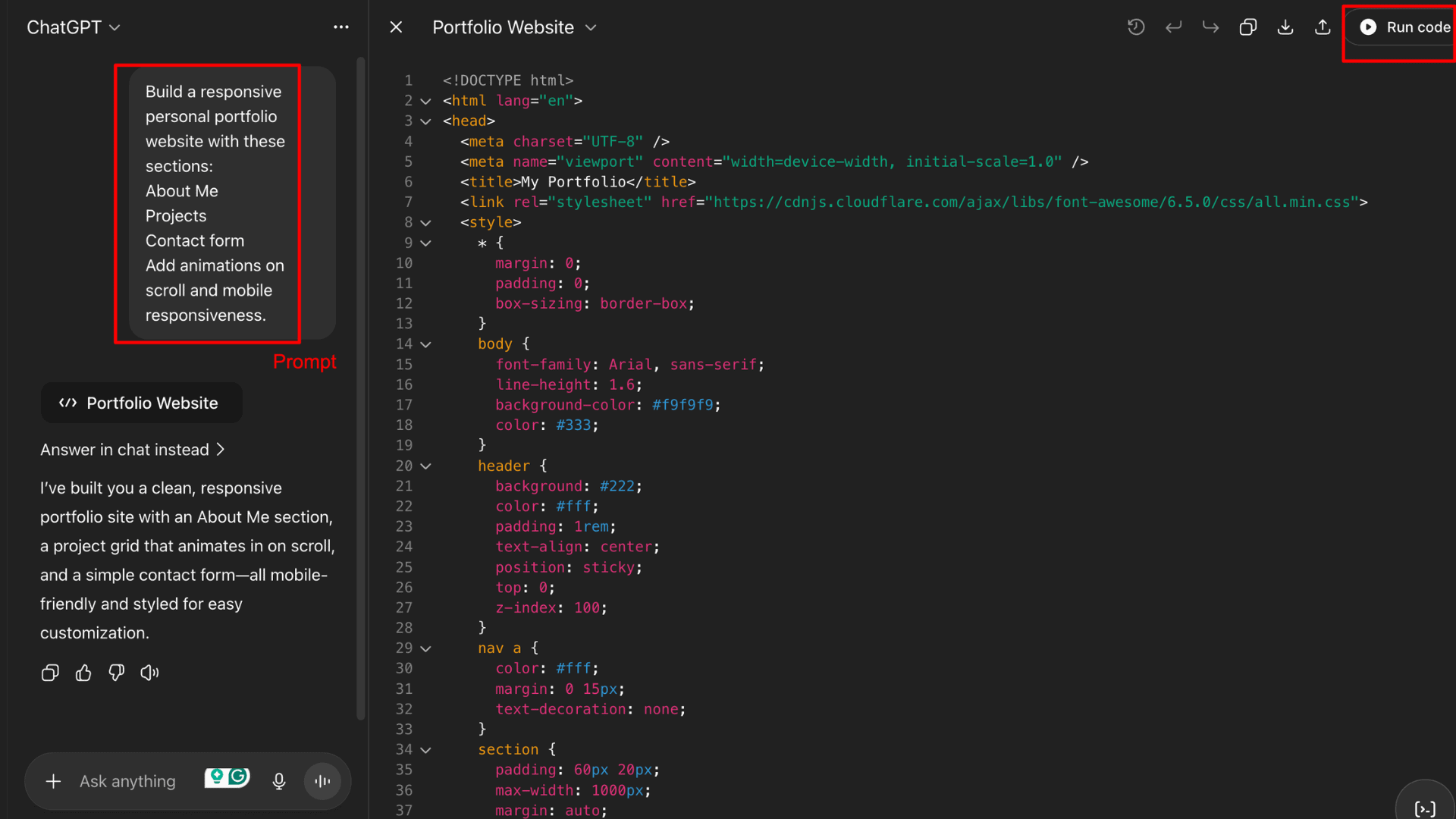
ChatGPT was the faster of the two to produce the website, and I was impressed by its colorful, visually appealing code formatting. However, the final portfolio felt too basic for professional use. It’s black and white, the “About Me” section is too short, and on mobile, the design looks outdated. On the plus side, ChatGPT allows you to download the project.
Coding- Gemini

Gemini went the extra mile in explaining its process. It also used colorful code formatting, though it wasn’t as visually engaging as ChatGPT’s. That said, the final website looks far more polished and professional on desktop and mobile.
It included a detailed “About Me” page with highlighted skills, a project page with well-structured content blocks, and the contact page renamed as “Get in Touch.” I found Gemini’s output ideal for professional use. However, it only allows sharing the portfolio; downloading isn’t an option.
Winner- Best for Coding
In this test, the clear winner is Gemini. And my conclusion isn’t based on this single challenge. I also trialed each, utilizing an alternate project: building a full-stack Poll Voting Web App. And Gemini came out ahead there as well. Its output is professional-grade, and its detailed explanations are especially helpful for beginners.
13. AI Assistants
ChatGPT and Gemini both provide customized AI tools for different use cases. For example, you can access writing assistants, math problem solvers, productivity helpers, and more. These tools are specialized for their specific purposes, so you don’t need to write detailed prompts to get relevant results.
AI Assistants- ChatGPT

ChatGPT offers AI assistants (custom GPTs) across multiple categories such as writing, productivity, research & analysis, lifestyle, DALL·E, programming, and more. Currently, there are nearly 159,000 active GPTs available, and most are free to use. However, to create your own GPT, you’ll need a ChatGPT Plus subscription.

For example, I used the Logo from DALL·E GPT, trained specifically for logo design with over 1M+ conversations. I simply described the type of logo I wanted, and it produced the design in just a few minutes.
AI Assistants–Gemini

Under Explore Gems, Gemini offers fewer AI assistants compared to ChatGPT. These AI assistants are very useful.

Gemini also allows you to create your own gems for free. I built a Research and Analysis gem by providing simple instructions on the objective and desired output format. Once set up, it consistently delivered results in the same structured format.

I tested Storybook from Gemini Gems. I asked it to create a magical fairytale-style children’s storybook. The results were amazing. You can even listen to these stories in different voices.
Winner-Best AI Assistants
In terms of variety, ChatGPT clearly leads with a vast number of AI assistants. However, not all custom GPTs are equally impactful. In contrast, Gemini’s assistants are fewer but highly useful, and the ability to create custom gems for free is a big advantage.
14. Integrations
ChatGPT supports integration with various third-party applications. You can connect to ChatGPT with Google Drive and with Microsoft OneDrive for free. Pro users get access to more connectors, including Notion, Dropbox, GitHub, Outlook, Canva, HubSpot, and others.
Gemini works seamlessly across the Google Workspace ecosystem. It integrates directly with YouTube, Gmail, Google Docs, Google Drive, Google Maps, and more.
15. Usage Caps & Context Windows
In case you don’t know, a context window refers to the number of tokens an LLM can process at once. It includes both input prompts and generated outputs.
ChatGPT previously offered a context window of 128,000 tokens. With the launch of GPT-5, this has increased to around 256,000 tokens, according to the official website. On the free plan, you can use GPT-5 for roughly 30 messages per day, with limited file uploads, deep research, memory, and context capabilities.
Gemini, on the other hand, offers a much larger context window. Gemini 2.5 Flash supports nearly 1 million tokens, and with the Pro plan, you can work with 2 million+ tokens. As for usage caps, Gemini hasn’t provided clear details.
16. Data Privacy

ChatGPT’s privacy policy mentions that it collects log data, account information, usage data, device information, and more. These details may be shared with third parties. However, ChatGPT offers a temporary chat option that does not store chat history for long.

Gemini’s privacy policy states that it stores chats, live interactions, images, files, and screen captures to improve and personalize Google products and services. It does not offer a temporary chat option.
So, both ChatGPT and Gemini collect user data to train AI models, improve services, develop new programs, and conduct research. I would recommend not sharing sensitive information.
17. Price
Pricing-ChatGPT
ChatGPT offers three paid plans in addition to its free plan.
1) Plus Plan – $20/month
Includes access to GPT-5 with advanced reasoning, Sora video generation, OpenAI Codex agent, and more.
2) Pro Plan – $200/month
Full access to GPT-5 with ChatGPT Pro reasoning, unlimited messages and uploads, faster and unlimited image creation, expanded Sora video generation, expanded Codex agent, and early access to research previews of new features.
3) Team Plan – $25/month per user (billed annually)
Designed for collaborative work. Includes everything in Plus, plus access to standard and custom integrations, built-in agents, business-essential security, and more.
Pricing-Gemini
Gemini offers only two paid plans as well.
1) Pro Plan – ₹1,950/month.
Includes video generation with Veo 3, deep research premium features, 1,500 pages of file uploads, Flow filmmaker (cinematic scene tool), Notebook-LM (research and writing assistant), 2TB cloud storage, and more.
The best part? Gemini Pro comes with a 1-month free trial for all users. Students can even get a 1-year Gemini Pro upgrade for free.
2) Google AI Ultra: ₹24,500 INR/month
Designed for the highest level of access, it includes full access to Veo 3, access to Gemini 2.5 Deep Think, Flo, and Jules coding agent, NotebookLM, Gemini in Gmail, Docs, Vids, and Project Mariner, YouTube Premium (individual plan), 30 TB cloud storage, etc.
Key Insights: ChatGPT vs Gemini
Let’s conclude the results then!
What I Like About ChatGPT
ChatGPT stands out for its ease of use and all-in-one capabilities across text, image, and video generation. With the launch of GPT-5, it has further improved in content creation, creative tasks, and delivering well-structured, polished outputs. If you write with it, here is how to use ChatGPT to write essays without getting caught.
What I Like About Gemini
Gemini shines in image generation quality, detailed explanations for research and coding, engaging live interactions via its mobile app, and strong personalization options. Google keeps shipping beyond Gemini too — here is how to use Google Omni Flash for free.
Final Verdict
Wondering who’s the winner — ChatGPT or Gemini?
For a fair comparison, I tested both apps across 16 free parameters. ChatGPT excelled in 7 parameters: user interface, web search, deep research, file analysis, creative writing, AI assistants, and integrations.
Gemini led in 5 parameters: voice interactions, SEO, coding, context window, and price. There was a tie between the two in 4 parameters: image generation, content creation, complex reasoning, and data privacy.
I couldn’t compare video generation capabilities, as both tools offer this only for paid users. In terms of pure numbers, ChatGPT comes out as the winner. That said, there are edge cases where either tool could take the lead depending on your specific use cases and prompts.
If you’re a Google Workspace user, Gemini will feel more seamless. OpenAI is now available on WhatsApp. And if you’re a student, you can enjoy Gemini Pro free for a year with premium features.
FAQs
Which is better for students?
Both ChatGPT and Gemini can be valuable for students, depending on their specific needs. But, ChatGPT offers hundreds of custom GPTs trained for research, subject-specific guidance, academic help, and other purposes.
Which AI tool is more accurate?
Accuracy depends on the task and how the chatbot is used. In my tests, ChatGPT delivered higher accuracy during deep research and web search.
Can both do real web searches?
Yes, both Gemini and ChatGPT can perform real-time web searches. However, ChatGPT offers specialized AI tools for web searches, which Gemini currently lacks.
Do they support voice input/output?
Yes. In both ChatGPT and Gemini, you can dictate or record prompts instead of typing. ChatGPT also offers voice modes for natural conversations through its desktop and mobile apps, while Gemini’s voice mode is available only on mobile.
Are there free versions available?
Absolutely! Both ChatGPT and Gemini offer a wide range of free features. The ChatGPT-5 model is currently free to use. In Gemini, you can access the Gemini 2.5 Flash model for free.
Which is faster or more responsive?
In most of my tests, ChatGPT responded faster than Gemini. For example, when coding or processing files, ChatGPT handled heavy traffic more smoothly.


