
Did you ever have an app idea but gave up just because it was too complicated to build? Well, what if you could build entire apps in minutes without knowing coding at all? It’s possible with Rork AI.
After testing it out for a few weeks and building multiple apps with it, I’m finally here with the Rork AI Review. In this review, we will discuss its key features, the apps I built, its pricing, pros, cons, alternatives, and a lot more.
I tested Rork AI over several weeks on my own account, building multiple apps across both the free and paid plans. Every price, credit limit and feature note below is what I saw as of August 2026.
So, do you want to discover an easier way to build fully functional apps? Let’s dive right in!
Table of Contents
What is Rork AI?
Rork is an AI-powered tool for creating mobile and web apps within minutes. It was co-founded by Daniel Dhawan and Levan Kvirkvelia in 2024. This innovative platform lets you develop apps and games through text descriptions.

And the best part is, you don’t need to know a single line of code to use it. Rork can be used to develop apps for iOS, Android, and even web apps.
Rork AI Overview (Table)
| Platforms | Android, iOS, Web |
| Free Plan | Yes (35 credits/month, 5/day) |
| Code Export | ✅ Yes |
| GitHub Sync | ✅ Yes |
| Best for | Building mobile & web apps with AI |
| Pricing | Starts from ₹649/mo |
| Payment Methods | UPI, Credit Card, Apple Pay, Link |
| Refund Policy | ❌ N.A. |
Key Features of Rork AI
1) Text Prompts to Apps
Rork AI can convert simple text descriptions written in natural language into professional apps. You don’t even need coding expertise to work with it. Just use plain English prompts to get your desired apps built in minutes!

2) Multiple Types of Apps
You can use Rork AI to develop mobile apps for Android and iOS. It also lets you build web apps effortlessly.
3) Easy Bug Resolution
If your app encounters bugs and stops functioning, you can resolve them through simple text prompts as well.
4) Allows Media Imports
Along with your text prompt, Rork AI allows you to upload photos, attachments, and video mockups for design inspiration. It also lets you import UI from Figma.

5) Quick App Publishing
Not only does Rork AI allow you to build professional-level apps, but it also lets you directly publish them on the Google Play Store and App Store.
6) Code Export
If you want to edit or debug your code later, Rork AI lets you export the entire code and use it with an IDE like VS Code, Android Studio, etc.
7) Syncs with GitHub
Rork AI seamlessly syncs with GitHub on paid plans. So, if you create your project repository on GitHub and make changes on Rork, they will be synced on GitHub and vice versa. Additionally, it also gives you the option to clone your repository and work solely from GitHub.

8) Live Preview
Before publishing your app, you can preview it live in the browser or test it on your mobile devices by scanning a QR code. You need to have the Expo Go app to preview it. It also lets you share your app with others.
9) Integrations
Rork integrates with a variety of third-party service APIs in your app. So you can extend the functionality of your apps by connecting them.
How To Use Rork AI?
Follow the steps below to understand how to use Rork AI to build apps.
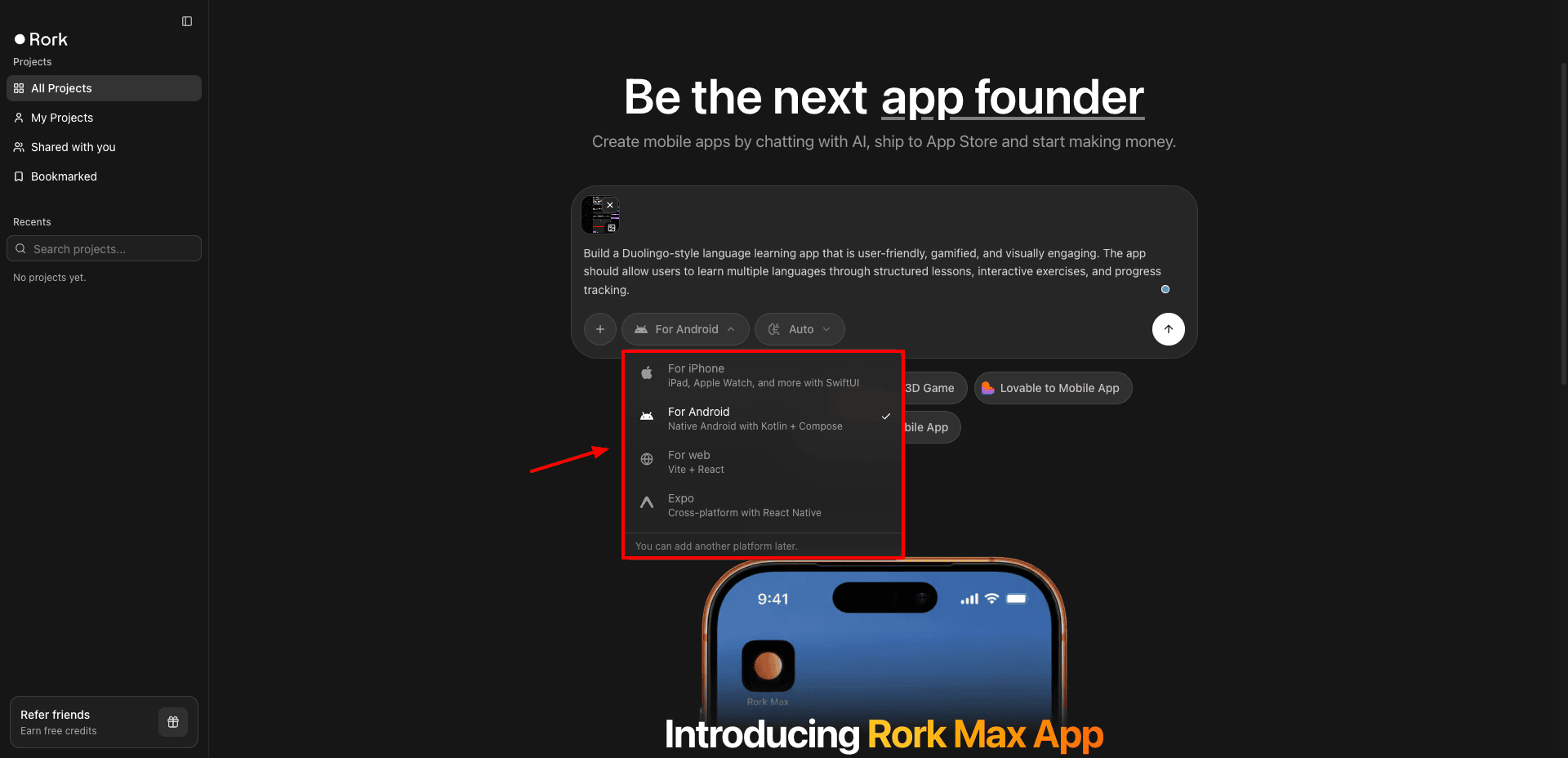
- First, visit the RORK official website and sign in with your Google account for free.
- Next, describe your app within the text prompt window. Make sure to provide a detailed description, mentioning every feature you want in the app.
- Specify if you wish to build an app for iPhone, Android, Web, or Expo.
- Optionally, enter any supporting images or attachments, and hit ‘Enter’.
- Within a few minutes, your app will be generated.
- Finally, you can create the repository on GitHub, share the live preview link with your friends, or download the code to be used on any IDE.
Demo Apps Built with Rork AI
Here are a few applications I tried to build using Rork AI.
1) Food Ordering and Delivery App

I created a food ordering and delivery app (Zomato clone) with Rork. It lets viewers discover nearby restaurants, browse through menus, place orders, make payments, and track their deliveries in real time.
It also offers features for restaurants (menu & order management), delivery partners (handle earnings and deliveries), and admins (manage payments, analytics, users, etc).
2) Language Learning App

I created a gamified language learning app (Duolingo clone). It helps users learn multiple languages through interactive lessons, exercises, and practice activities for grammar, vocabulary, speaking, and listening.
It also includes features like streaks, XP, badges, daily goals, leaderboards, etc to make learning engaging and fun.
3) Puzzle Game App

I generated a Candy Crush–style match-3 puzzle game with Rork AI. In this game, players swap colorful candies to create matches, clear the board, trigger special candy combos, and complete level targets.
The game includes multiple levels, limited moves, boosters, star ratings, animations, sound effects, progress tracking, and a fun, colorful interface with features like daily rewards and tutorials.
Rork AI Pricing
Rork AI offers 2 different paid plans. The following table compares their pricing and key features.
| Rork Pro | Rork Max | |
| Pricing | $20/mo | $200/mo |
| Monthly Credits | 100 | 1000 |
| Platforms Supported | Expo, Android, Web | Expo, Android, Web, iOS, iPad, Apple Watch, & Vision Pro |
| Private Projects | Yes | Yes |
| Dev Mode | Yes | Yes |
| Support | Priority Chat |
Apart from these, Rork AI also features a Rork Start plan specifically for Indian customers. It’s priced at ₹649/mo and offers 40 monthly credits, support, Expo projects, Android apps, and web apps, and makes use of Light AI models.
Free Trial
You get a free trial of the Rork Max plan with 5 free uses. It offers 35 monthly credits and a daily limit of 5 credits.
On this plan, you can build web apps and public projects. It lets you preview apps and view the code in read-only mode. Code exports are not allowed on the free plan.
Payment Methods
It accepts payments through the following methods: International credit cards, UPI, Apple Pay, and Link.
Refund Policy
Rork AI doesn’t offer any refunds on your purchased plans. So if you purchase a plan and are not satisfied with it, you won’t get any of your money back.
Rork AI Cons
1) Slow Generation
Building an app with Rork takes about 10-20 minutes, and sometimes even more depending on the app’s complexity.
2) Errors Spotted Frequently
You may notice that it creates errors often within the build when working with complex apps. Then you need to fix the errors and bugs using text prompts.
3) Credits Don’t Roll Over
On Rork AI subscription plans, your unused credits don’t roll over to the next month. If you haven’t used up your credits in a particular month, they will expire. They also don’t offer any refund policy.
4) No Free Code Exports
On the free plan of Rork AI, you are not allowed to export the code. You can only view it in read-only mode.
Who Should Use Rork AI?
In my experience, Rork AI is perfect for both beginners and professionals. Beginners can create full-fledged apps without having a coding background or coding skills. At the same time, developers can create even bigger and more complex projects with minimal effort using Rork.
It is ideal for students who need to build a portfolio app, professional developers who want to create quick apps, small businesses and solopreneurs who wish to test out an app idea, and non-technical product managers who want to build an app prototype.
Rork AI Alternatives
Currently, the best alternatives to Rork AI are Lovable and Bolt. The following table compares their major features.
If you only need the interface rather than a working app, that is a different job. Google Stitch turns a single prompt into an app UI for free, and pairs well with Rork for the build step.
| Rork AI | Lovable | Bolt | |
| Output | iOS and Android app | Web app | Web app |
| Free plan | 35 credits/mo, 5/day | 5 credits/day | 300k tokens/day, 1M/mo |
| Backend/Database | Limited | Full-stack via Supabase | Limited |
| App Store/Play Store Publishing | Yes, built-in via EAS | No | No |
| Code Export | Yes, full React Native export | Yes, full code export | Yes, full code export |
| Best For | Mobile app founders, creators wanting a companion app | SaaS products, web dashboards, full-stack MVPs | Fast front-end prototypes and demos |
Conclusion
In this article, we did the Rork Review. It’s a powerful no-code platform for going from idea to a fully functional app. It not only lets you create apps using text prompts but also publish them on the App Store and Google Play Store directly.
In my experience, you should start with its generous free plan. You can use it to build various prototypes and test if it’s suitable for your workflow. I would recommend it to students, developers, small businesses, solopreneurs, and product managers.
Anyway, do you have any app ideas in mind? And do you think the Rork AI tool could build it for you? Do try it out and let me know your opinions in the comments below. And if you are collecting free AI tools, here is how to use Google Omni Flash for free. Cheers and keep learning!
FAQs
Does Rork AI have a free plan?
It offers a free trial of the Rork Max plan where you get a limit of 5 credits/day and 35 credits/month.
What kind of apps can you build with Rork AI?
Rork AI lets you build web apps, Android apps, and iOS apps using text descriptions.
What happens if I run out of credits?
If you run out of credits, you cannot modify or create any new projects till your monthly credits reset. Alternatively, you can upgrade to a higher plan to continue working on your project.
Is Rork AI available in India?
Yes, recently Rork has introduced the Rork Start plan specifically with an INR pricing of ₹649/mo. It also supports UPI payments for Indian customers.


