
Sora 2 is a new trend, and you might have seen everybody posting videos created using this AI model. Yes, everyone has been trying this model and creating their own videos to post on social media.
Sora 2 can generate videos of any type. You can even upload your own face and create videos using it. However, the unfortunate part is that Sora 2 is only available in the United States and Canada. Despite these geo restrictions, people have figured out ways to try out the AI model in the regions where it’s not available yet.
So, how to use Sora 2 in India? Well, for starters, you need a VPN to overcome the geo restriction, and then you need the invite code to access the model. This article will guide you through the complete step-by-step process on how you can access and use Sora 2 in India and other regions.
What is Sora 2?
OpenAI released Sora on 15 February 2024. Sora lets users generate videos from text. Not only this, but it also allowed multiple input types and multiple shots. Apart from this, it could generate 1080p videos up to 20 seconds long. Although it had one major limitation, that it could not generate audio.
On 30 September 2025, OpenAI announced Sora 2, which overcomes all the limitations users had with the previous version. Here are all the features of Sora 2-
- Synchronized Sounds- Sora 2 generates the audio, which includes dialogue and sound effects. Also, the audio gets synced to the video.
- Cameo– There’s a new Cameo feature that allows you to add your own face or someone else’s in the video.
- Image to Video- While the Sora 1 was limited to text to video, with Sora 2, you can convert still images into videos.
App Access- Sora 2 is also available as a dedicated iOS app called ‘Sora’.
Prerequisites for Accessing Sora 2
Sora 2 isn’t available to everyone, especially if you are living in India. There are some prerequisites that you must have-
- VPN- Sora 2 is only available in the United States and Canada. If you live in any other country, like India, then you will have to use a VPN to access Sora 2. I used Surfshark VPN to use Sora 2, but you can use any other VPN of your choice.
- Invite Code- You need the Sora 2 invite code to access the platform. Sora 2 is only available to a limited user via the invite method. You will only be able to access Sora 2 if you have an invitation code for it.
Discord Account- You also need a Discord account. Well, this is to get the Sora 2 Code, which we will discuss later in the article.
How to Use Sora 2 in India?
To access Sora 2 in India, first, you need to get an invite code, which you can get through their official Discord server. After that, you need to connect to the US server through a VPN and access Sora 2. You will have to use your invite code to access the newer version of the platform. Here’s the complete step-by-step guide on how to do that-
1. Join OpenAI Discord Server
So, first, you need to join the OpenAI official Discord server. Here’s how you can do that:
Step 1: Open this Invite Link on your browser.
Step 2: This will open Discord in your browser.
Step 3: After this, create a Discord account. You can enter your name and date of birth, and follow the on-screen instructions to create your account.

Step 4: If you already have an account, then click on Log In.

Step 5: Now enter your login credentials, and then click on Login.

Step 6: Now, click on Accept Invite.

Step 7: Once you do this, it will ask you a few questions before you can join the server. Answer these questions and then move on to the next step.

Step 8: Next, agree to all the server rules, and click on Finish.

Step 9: Once you do that, you will have joined the OpenAI Discord server.
Step 10: After this, open the OpenAI Server on Discord.
Step 11: Now, in the left pane, click on the #openai-verification option.

Step 12: Now, in the right pane, click on Verify with OpenAI.

Step 13: Click on Visit Site now.

Step 14: After this, click on the Start Verification button.

Step 15: On the next page, click on the Authorize option.

Step 16: Now, sign in to your OpenAI account. You can sign in with the following options- Email
- Apple
- Microsoft
- Phone number
Step 17: Let’s select Continue with Google and follow the on-screen instructions to sign in.

Step 18: Once you do that, they will add your account to the verification queue.
Note
It may take 1-2 days for your account to get verified. My account got verified after 2 days.
2. Find Sora 2 Invite Code
After you verify your account, you must find the invite code on the server. Trust me, this is going to be the hardest part in the entire process. Here’s how you can do it-
Step 1: Head over to the OpenAI server in the left pane.
Step 2: Now, click on #sora-2-codes.

Step 3: From here, you can find the invite codes.
Step 4: You will see people messaging codes here; you can use them.
Step 5: If anyone says they have an invite code, then you can message them to get the code.
Note
Some users might ask you for money for codes, so it’s better to avoid them. It might take some time to find the code.
3. Access Sora 2 in India
Now, once you have the code, you can use Sora 2 in India. First, you need to connect to VPN server, and then enter your invite code on Sora. For this article, we are using Surfshark VPN, but you can use any VPN of your choice. Let’s see how:
Step 1: First, launch Surfshark VPN on your PC.
Step 2: Now, select the United States as the location, and connect to the VPN.
Step 3: In your browser, head over to the Sora website.
Step 4: Now, click on the Log In option.

Step 5: This will open the ChatGPT page; click on Log in again.

Step 6: Now, sign in with the options. Let’s Continue with Google for now.

Step 7: Follow the on-screen instructions to log in to your account.
Step 8: After this, enter a new Sora username to continue.

Step 9: Once you do that, click on Next.
Step 10: Now, you will see a screen that says, ” Meet the new Sora.” On this screen, click on Enter Invite Code.
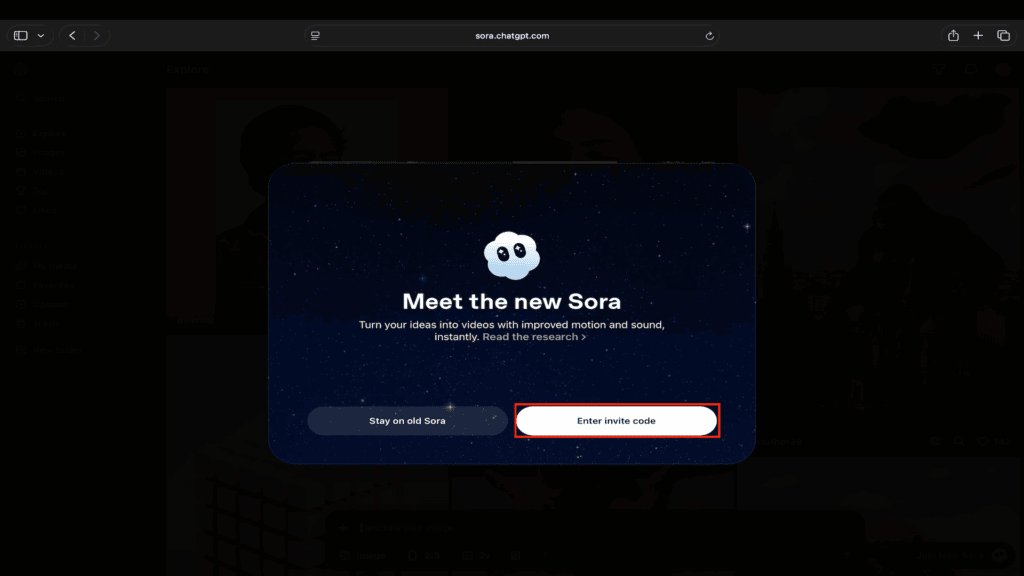
Step 11: Now, enter your invite code, and click on Join New Sora.

Step 12: This will enable Sora 2 for you, and you can use it while living in India.

4. Using Sora 2 to Create Videos
Now that you have access to Sora 2, you can use it to create videos. So let’s create the very first video with Sora 2. This one is going to be a basic one, but you can go with your own creativity. Here’s how to create your very first video with Sora 2:
Step 1: Click on this text prompt at the bottom.

Step 2: Now, here, describe your video.
Step 3: For example, let’s go with-
Prompt
Lamborghini and Ferrari racing together on a racetrack 
Step 4: Now, this will add the view to the queue.
Step 5: Once you do that, click on the Profile icon on the left bar.

Step 6: Now, under the Drafts, you will see your video; click on it to open it.
Step 7: You can click on Post to post the video.

Step 8: To download it, click on the three dots, and then on Download, and this will download the video.

Conclusion
Accessing Sora 2 for Indian users is a bit tricky. But if you do manage to do so, then this will unlock a whole new level of creativity for you in video creation. But yes, it does require some extra steps if you want to use Sora 2 in India.
There are three major steps: First, join the OpenAI Discord Server; second, get the invite code for Sora 2. The third and final step is to use a VPN to access Sora, and use your invitation code to activate Sora 2.
The above guide should help you with the complete process. Once you have access to Sora 2, you can create realistic AI videos with text or through your face. You have endless creativity unlocked at your fingertips. All you have to do is type the prompt, and you will have social media content ready.
So what are you waiting for? Try Sora 2 now and let us know what videos you create using it in the comments below.
FAQs
1. Is Sora 2 Free?
Sora 2 is free, but you need an invite code to access it. There will be certain limitations for AI video generation, of course, on how many videos you can create, but it isn’t disclosed anywhere.
2. How to Get Sora 2 Invite Code?
You can get the Sora 2 invite code from the official OpenAI Discord server. You will find codes there, but you need to work hard for them.
3. Are There Any Content Restrictions on Sora 2?
Yes, there are some restrictions and content policies on Sora 2. You cannot generate copyrighted material, violence, or explicit content.
4. Does Sora 2 Require a ChatGPT Plus Subscription?
No, as of now, Sora 2 is available for free. You don’t need a ChatGPT Plus subscription to access Sora 2.
5. How Many Videos Can I Create Per Day On The Free Tier?
OpenAI hasn’t disclosed any limit to how many videos one can generate if they are using a free account.


