
Did you know ChatGPT is now available on WhatsApp?
Yes — you don’t even need an OpenAI account! You can chat with ChatGPT directly on WhatsApp without visiting the website or downloading the app.
However, if you simply search for “ChatGPT” in your contacts, it won’t appear. To make it work, you’ll need to use a special number, 1-800-ChatGPT, and follow a few quick setup steps.
Curious how it works? It won’t take over 10 minutes. So keep reading till the end to learn How to use ChatGPT on WhatsApp and explore the many ways it can assist you daily.
What is 1-800-ChatGPT?
1-800-ChatGPT is a new feature launched by OpenAI that allows you to interact with ChatGPT via phone calls or the WhatsApp messaging platform. You can have conversations, get writing help, receive real-time updates, and ask any questions, just like you do in the ChatGPT web or app experience.
The calling feature is currently available only to users in the USA and Canada. However, the WhatsApp feature can be accessed from any country where ChatGPT is supported.
How to Use ChatGPT on WhatsApp?
Using ChatGPT directly on WhatsApp is very simple. You don’t need to create an account. Just follow the step-by-step guide with me:
Step 1: Add a New Contact

Open WhatsApp and tap the ‘+’ icon at the bottom right. Here you’ll find the “New Contact” option.
Step 2: Change Country Code to USA

In the New Contact screen, enter ChatGPT as the first name. Then, change the country code from India (+91) to the USA (+1). Now type the number 1-800-242-8478 and tap Save.
Step 3: Search for ChatGPT Contact

After saving, tap the search icon in WhatsApp and type “ChatGPT.” You should see the contact appear.
Step 4: Start Chatting with ChatGPT

Now, start a conversation just like you would with any other contact. Send a message like “Hi,” and ChatGPT will reply instantly. You can then ask questions, get writing help, summaries, ideas, or even creative content.
For example, I asked it to write a few Instagram captions about the monsoon season. It gave me different options in various tones, like funny, poetic, romantic, and more.
Overall, the response time is fast. ChatGPT chatbot works seamlessly on both WhatsApp Web and mobile apps. To connect via WhatsApp Web, simply scan the QR code. The chatbot on WhatsApp will then appear on the chat list.
Examples of Use Cases for Using ChatGPT in WhatsApp
ChatGPT in WhatsApp supports both text and image generation. Below are a few practical examples to show how you can use ChatGPT for different everyday tasks and scenarios:
Example 1: Writing Social Media Captions
Prompt:
Prompt
Write Instagram captions for monsoon

Sample Prompt:
Prompt
Write Instagram captions for [insert topic.]Example 2: Business or Work Use
Prompt:
Prompt
Write a follow-up email for a pending invoice. 
Sample Prompt:
Prompt
Write a follow-up email for [insert topic].Example 3: Lifestyle and Wellness
Prompt:
Prompt
Give a 7-day full-body mobility yoga plan for a 29-year-old working woman.
Sample Prompt:
Prompt
Give a [insert number of days] full-body [insert fitness activity] plan for a [insert age]-year-old working [insert gender]Example 4: Daily Productivity
Prompt:
Prompt
Make a time-blocking schedule for a student with 4 hours of study.
Sample Prompt:
Prompt
Make a time-blocking schedule for [insert topic].Example 5: Shopping & Recommendations
Prompt:
Prompt
Suggest budget phones under ₹15,000 in India (2025).
Sample Prompt:
Prompt
Suggest budget [insert item] under [insert price] in [insert location (year)]Example 6: Communication Support
Prompt:
Prompt
Translate this message into Hindi: Let’s meet at the café around 7 PM.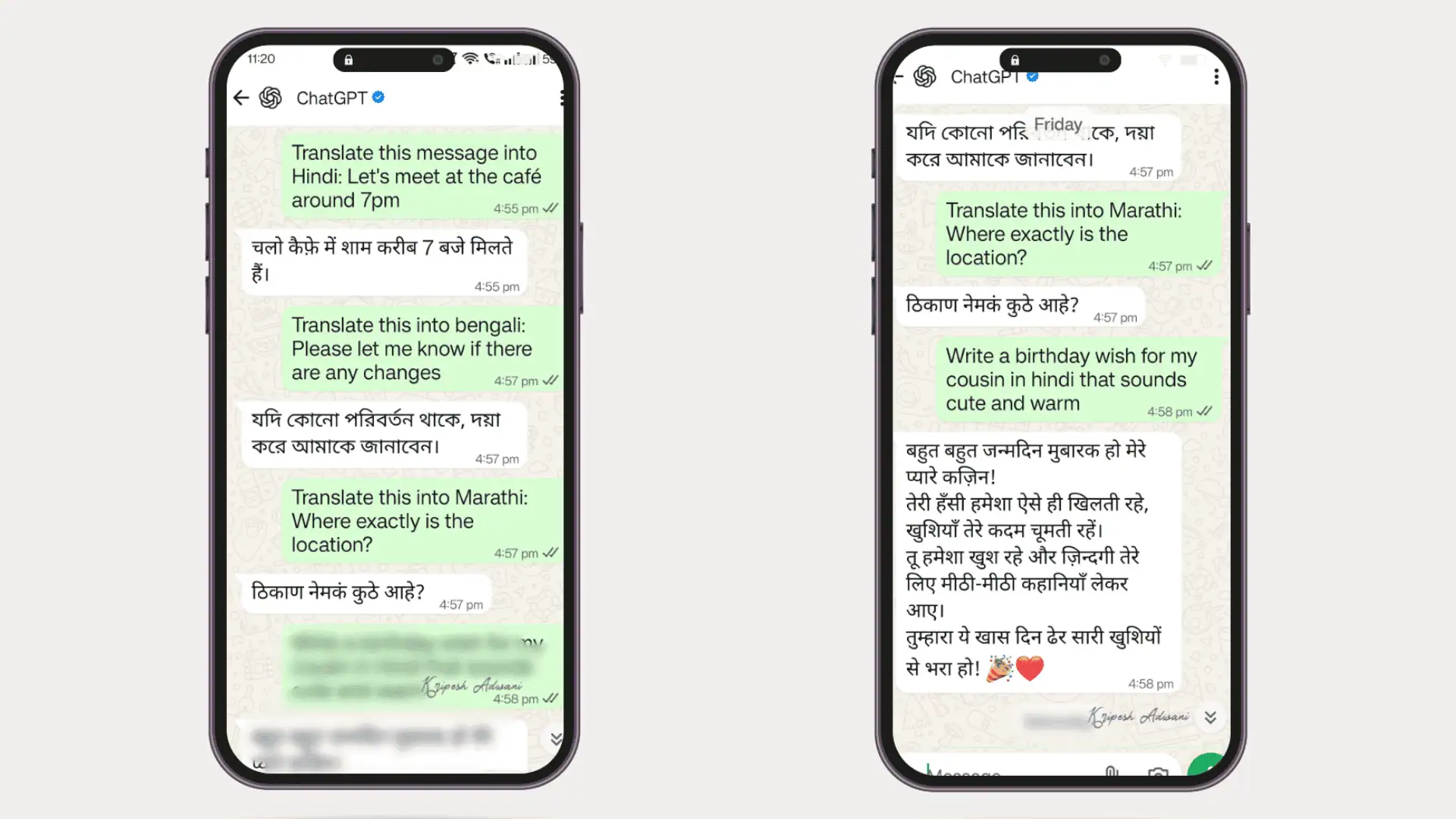
Sample Prompt:
Prompt
Translate this message into [insert language]: [insert sentence]Example 7: Generating Images
Prompt 1:
Prompt
Draw a scenic image of a sunrise over the Himalayas with birds flying in the sky.Sample Prompt 1:
Prompt
Draw a scenic image of [insert topic and details].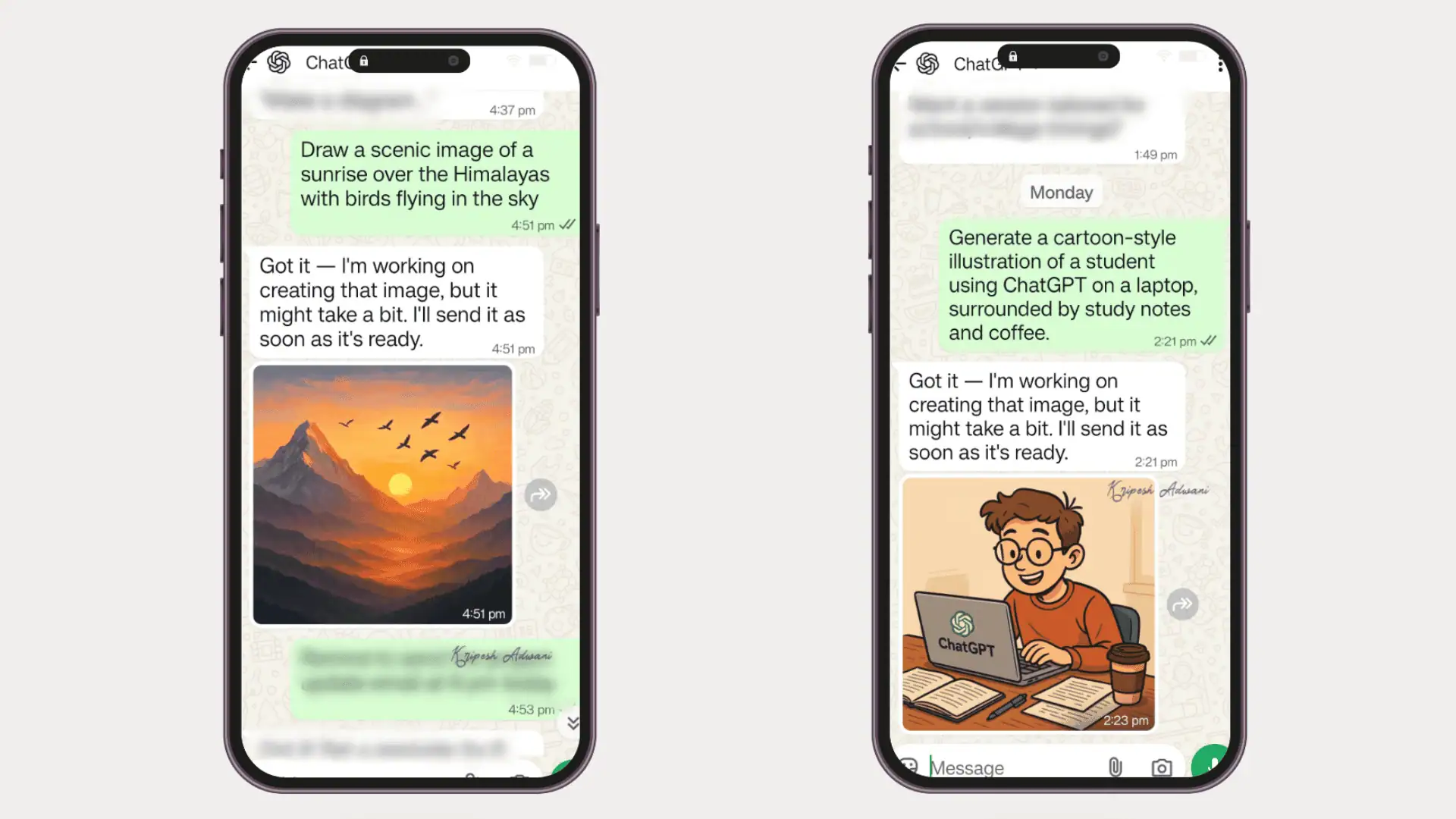
Prompt 2:
Prompt
Generate a cartoon-style illustration of a student using ChatGPT on a laptop, surrounded by study notes and coffee.Sample prompt 2:
Prompt
Generate a [mention image style] illustration of [mention image theme and other details]. Conclusion
Now you know what 1-800-ChatGPT is and how to set it up on WhatsApp. I’ve also shared various examples and sample prompts to help you use ChatGPT practically in your daily life.
No need to switch between multiple apps anymore for text-based conversations! ChatGPT can help you study, generate graphics, write captions, create productivity schedules, draft emails, translate messages, and so much more — all from WhatsApp.
So, what are you waiting for? Try it!
I’ll be back with more exciting AI discoveries soon. Until then, bye!
FAQs
Can I unlink my phone number from my OpenAI account?
No, you cannot unlink your phone number from OpenAI’s ChatGPT. Once you integrate ChatGPT on WhatsApp, your number gets linked to your OpenAI account.
What usage limits apply when I call or message 1-800-ChatGPT?
For calling, there’s a 30-minute monthly limit for users in the USA and Canada. As for WhatsApp chats, OpenAI hasn’t mentioned any fixed usage limits. If you reach your limit, ChatGPT will notify you automatically.
How do I know I’m messaging the real ChatGPT on WhatsApp?
Look for the WhatsApp-verified badge (blue tick) next to the ChatGPT contact name. Also, double-check the official number: 1-800-242-8478 when saving it in your contacts.
Does ChatGPT keep conversations on WhatsApp?
Yes, ChatGPT keeps your WhatsApp chat history linked to your ChatGPT account. If you delete any message, OpenAI states it will be removed from their systems within 30 days. ChatGPT stores user data for security and legal compliance.
Which ChatGPT model is used in WhatsApp?
ChatGPT on WhatsApp is powered by GPT-4o (Omni), the latest model by OpenAI. It can seamlessly handle text, images, audio, and more for a richer, multimodal experience.
Why is ChatGPT unresponsive?
If you’ve hit your daily or monthly usage limit, ChatGPT may stop responding. It can also be unresponsive during peak hours. Otherwise, make sure you have an active internet connection or network connection is stable.


