
Music creation used to be a complex and costly process. You had to hire voice artists and instrumentalists to compose a song. But with AI, the game is changing. You can now create complete songs, with vocals, lyrics, and instruments, in a few minutes!
In this article, we’ll walk you through how to create music with AI. Creating good music involves multiple steps. From generating lyrics to bringing them to life with sound, we’ll cover each step of the process. You’ll also find tips to improve the quality of your AI tracks.
So, are you ready to explore the world of music? Let’s dive in.
How to Create Lyrics with AI?
We will use ChatGPT to create our song lyrics. I tried multiple platforms, but ChatGPT offered the most relevant lyrical outputs. Let’s see how to create your song lyrics.
Step 1: Brainstorm Song Details
First, you need to decide what your song will be about. Then, note the specific details you wish to include in your song and the type of music you want. For example, I wanted to create a birthday song for my cousin. Here are the details I decided on for the song.
Prompt
Create a short birthday song for my cousin sister.

I want the song to share how special she is to me and include memories like our shopping together, our late-night conversations, our “aesthetic selfies”, and how she taught me dance for my wedding function, where we danced together. I also want to wish her luck for her first job.

In the last stanza, I want to share how I miss her very much, I miss the adventures and trips with her, how her voice notes make me so excited, and how my love for my little sis will always be the same.

The song should have 3 stanzas and a chorus. The music should be happy, bubbly, and cheerful, just like her. Keep the lyrics heartfelt and in simple English.
“Create a short birthday song for my cousin sister.
I want the song to share how special she is to me and include memories like our shopping together, our late-night conversations, our “aesthetic selfies”, and how she taught me dance for my wedding function, where we danced together. I also want to wish her luck for her first job.
In the last stanza, I want to share how I miss her very much, I miss the adventures and trips with her, how her voice notes make me so excited, and how my love for my little sis will always be the same.
The song should have 3 stanzas and a chorus. The music should be happy, bubbly, and cheerful, just like her. Keep the lyrics heartfelt and in simple English.”
Step 2: Enter the Prompt in ChatGPT
Now, once you are done with the song details, enter them as a prompt in ChatGPT. It will generate a song for you as per your instructions.

If you’re not satisfied with any parts, you can ask to edit or replace specific words or lines. You can keep iterating in the chat until you get the lyrics right. Then we will move to the next process.
How to Generate Songs with AI?
For generating our song, we will make use of Suno AI. It’s one of the most realistic AI music generators right now.
Step 1: Sign Up on Suno AI
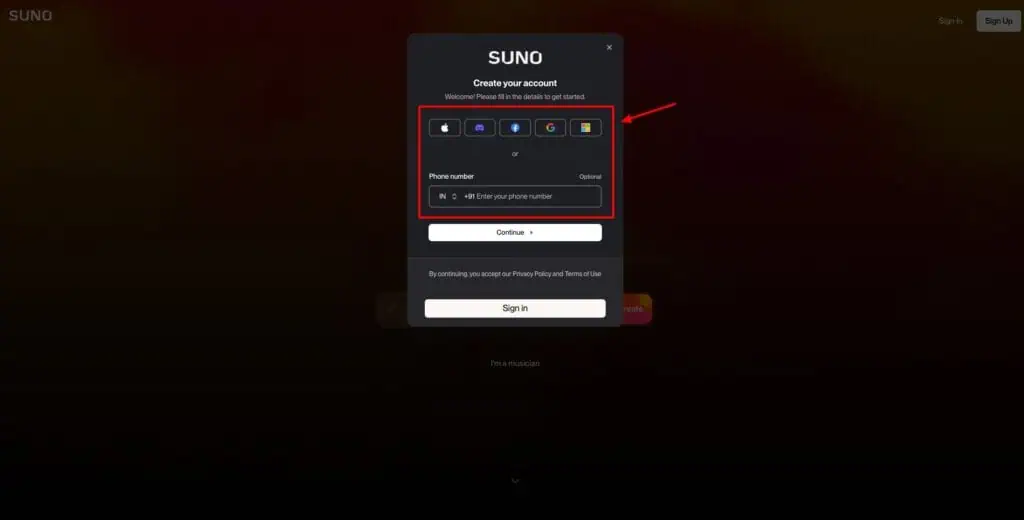
First of all, you need to create a free account on Suno AI. There are multiple ways to sign up on Suno. You can use a Google, Apple, Discord, Facebook, or Microsoft account. Alternately, you can also enter your mobile number.
Step 2: Paste Your Lyrics
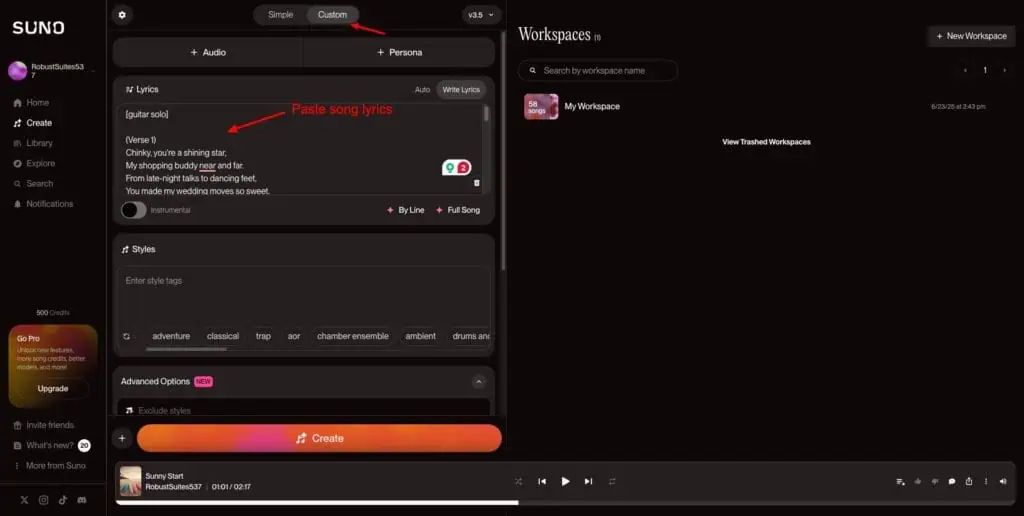
Next, visit the Create tab. Go to the ‘Custom’ section and paste your song lyrics. You can also use Suno’s AI song generator. But it doesn’t produce accurate results.
Step 3: Select Song Styles
After pasting your lyrics, select styles that would work with your song. Keep pressing the rotate icon to shuffle the song styles.
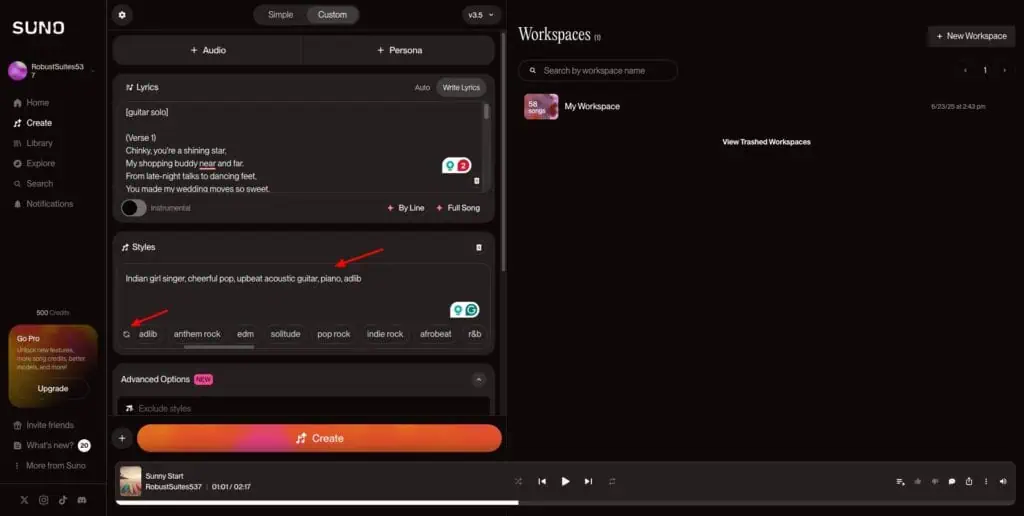
You can also manually add any styles if you want. I particularly loved the songs created in the Bollywood style! Finally, add a song title if you have one.
Step 4: Generate Song
Hit the ‘Create’ button, and Suno AI will generate 2 variants of your song within seconds. The AI-generated music is commendable!
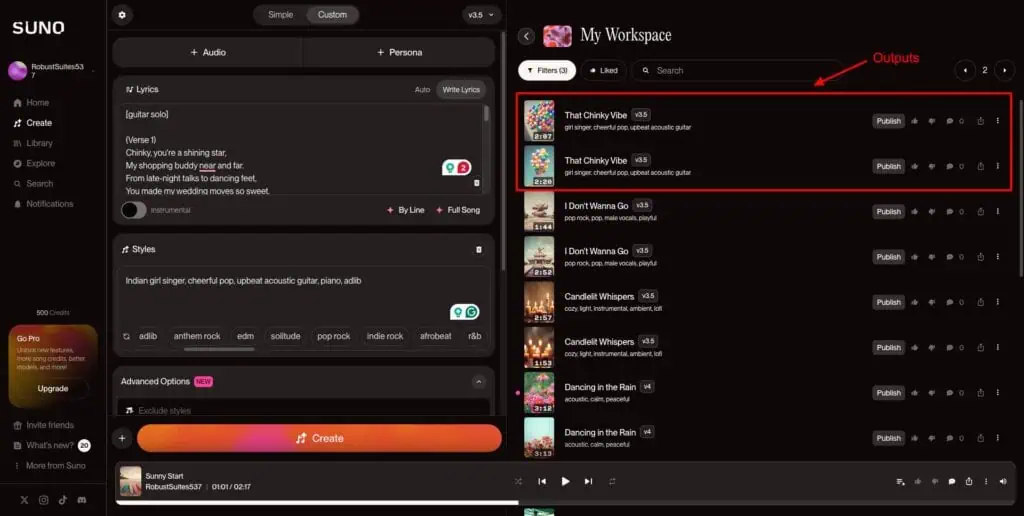
However, I didn’t like how it repeated a verse twice for no reason. There are no settings to fix this right now. Alternatively, you can also create a song by just describing what you want. But this method may require lots of edits, as the outputs are unpredictable.
Here’s the final song I generated with Suno AI for my cousin sister’s birthday!
How to Create Music with AI (Instrumental)?
What if you don’t want a song with lyrics? What if you only need background music for your YouTube video, podcast, vlog, or social media posts? You can do that too with Suno AI.
Step 1: Select Instrumental Option
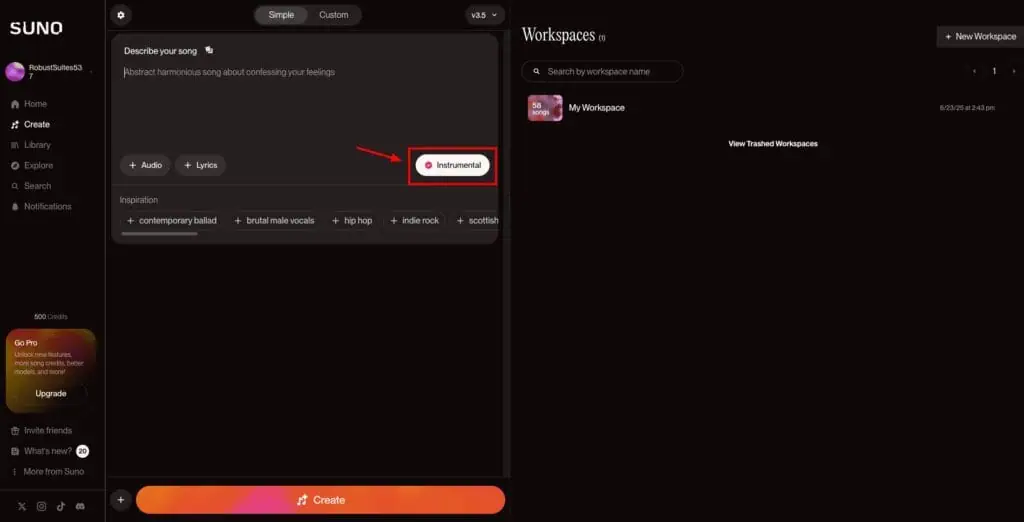
First, we will head over to the ‘Create’ tab. Then, we will check the Instrumental option. This will ensure Suno AI generates instrumental music for you.
Step 2: Write Your Prompt
Next, describe the type of music you wish to create. Make sure to include the following things in your prompt:
- Purpose (podcast, video, vlog, live stream, etc.)
- Emotion or Mood (happy, uplifting, cozy, suspenseful, etc.)
- Genre or Style (lo-fi, jazz, cinematic, Indian classical, Bollywood, ambient, EDM, etc.)
- Instruments (Flute, Guitar, Piano, Drums, etc.)
- Tempo (slow, calming, medium-paced, upbeat, energetic, fast, dramatic, etc.)
- Duration (Intro music, loop music, or specific interval like 30/60 sec, etc.)
Including these details will ensure you create great instrumental music in one go and avoid unnecessary regenerations. Below the text box, you will also find tags for inspiration. You can click on all the tags that are relevant.
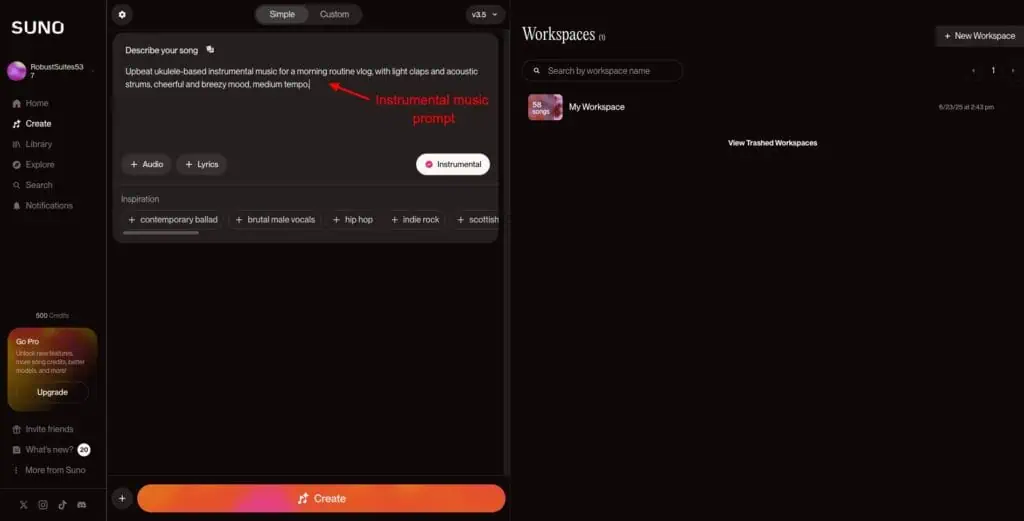
For example, here’s my prompt for generating a morning routine music for my vlog.
Prompt
Upbeat ukulele-based instrumental music for a morning routine vlog, with light claps and acoustic strums, cheerful and breezy mood, medium tempo.”Step 3: Make Edits
Suno AI will generate 2 versions of the instrumental music for you. You can listen to both and decide which one sounds better. You will also find a few editing options on the free plan.
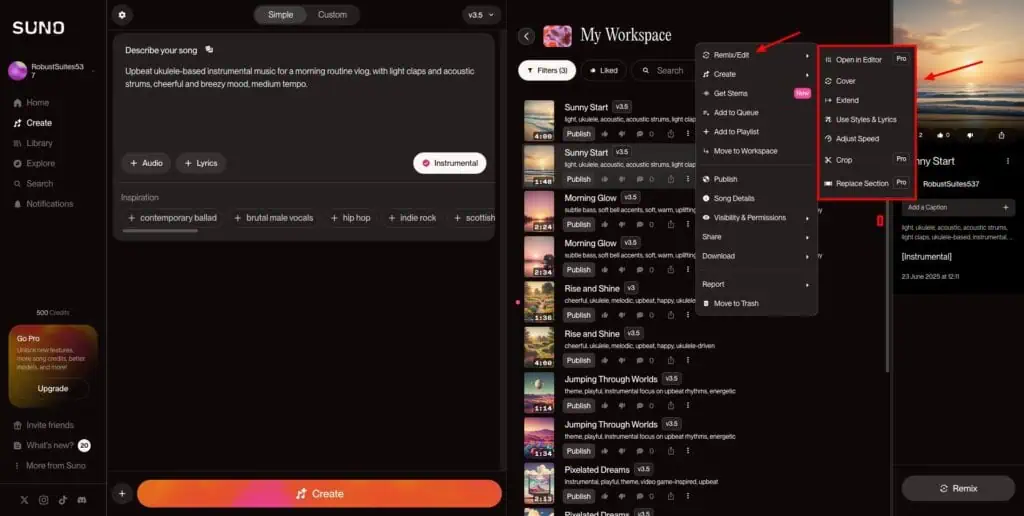
Click on the 3 dots beside the song of your choice. Head over to the ‘Remix/Edit’ option. Here, you can customize your song in the following ways:
- Adjust the speed of your soundtrack.
- Extend it by providing the time, music style, and lyrics.
- Reuse the style and lyrics of your current song to create a new one.
- Create a cover, replacing the music style while keeping the melody intact.
Here’s the final background music generated for my morning routine vlog!
So, this is how you can create music with Suno AI. The free plan of Suno AI gives you 50 credits that renew daily. Each song generation consumes 5 credits. However, as 2 outputs are produced on every generation, you can create 5 unique songs with 2 variants every day!
Examples of Music Generated with Suno AI
1. Stuck on Zoom
Prompt
A funny song about Zoom fatigue, annoying coworkers, and a love-hate relationship with Mondays. Acoustic guitar, light drums, bass, and quirky synths.2. Beast Mode On
Prompt
Create a hardcore gym song in rock/metal style. Theme: pushing through pain, strength, focus, and domination. Add heavy guitar riffs, deep bass, and intense drums.3. Yaari Wali Raat Hai
Prompt: (Custom Lyrics generated with ChatGPT)
Prompt
Give me an upbeat Bollywood dance track in Hindi with dhol, electronic beats, powerful vocals, and a mix of traditional and modern Bollywood instruments like tabla, tumbi, shehnai, harmonium, synths, electronic bass, and EDM-style drops. Theme: celebrating friendship, dancing all night, and desi swag. Keep the energy high with a catchy hook.4. Wanderlust Anthem
Prompt
Create a breezy, uplifting travel vlog song. Theme: adventure, road trips, freedom, cinematic, and feel-good. Use acoustic guitar, light drums, soft piano, and ambient pads.Tips and Tricks to Use Suno Effectively
Here are a few tips to get the most out of Suno AI while you generate songs or instrumental music tracks.
1. Write Descriptive Prompts
When you write your music prompts, avoid keeping them short and concise. Make sure to include the details you want, like style, tone, mood, duration, etc.
2. Use Special Characters
When you paste your song lyrics in the editor, use the following special characters to make the AI understand the context.
| Special Characters | Purpose | Examples |
| Commas, dots, dashes, and all caps | Pronounce words in specific way or stress on them. | Leave me…let me beI WON’T GIVE UP!! |
| Square brackets | Give commands or instructions | [instrumental solo][build up][pause][spoken word][male vocals][guitar solo] |
| Round brackets | Sing text as adlibs (improvised lyrics) | (Yeah!)(Ooh ooh ooh..)(Come on..)(Let’s go!) |
3. Explore Popular Music
To get music inspiration, you can check out the music generated by others on Suno. The Home tab features popular songs and music tracks created by fellow Suno users. Under the Explore tab, you get a wheel with hundreds of music styles you can preview.
Conclusion
In this article, we explored how to create music using AI, with a special focus on Suno AI song maker. While the platform can feel a bit overwhelming for beginners, its range of features makes it a powerful tool for generating impressive and original songs with ease.
I hope this quick guide gave you a clear starting point. Have you tried making a song yet? How did it go? Was it fun or a bit tricky? I’d love to hear your thoughts in the comments. Until then, happy music-making! Cheers! 🙂
FAQs
Can AI generate both lyrics and melody?
Yes, Suno AI lets you create both instrumental music and songs with lyrics.
Do I need any musical knowledge to use AI music generators?
No, complete beginners with no musical knowledge can use AI music generators as well. All you need to do is write a good prompt.
Can AI compose music in different genres and styles?
Yes, you can either enter music genres and styles manually or choose from Suno AI’s pre-designed library of style tags.
Can I use AI-generated music for commercial purposes?
It depends on the platform you use to generate the AI music. For example, on Suno AI, you get the commercial usage license on its paid subscriptions. On its free plan, you can only generate tracks for non-commercial use.
What are the limitations of AI in music creation?
A major limitation is that you can’t edit every tiny detail in AI-generated music. Additionally, Suno AI also repeats song verses at times. There are no options to prevent this right now.
How do I add instruments or beats to AI-generated lyrics?
You can include them in square brackets at the desired place in your lyrics. For example, [soulful piano sequence] or [upbeat guitar chords].
Can AI help me remix or enhance existing tracks?
Yes, Suno AI offers a ‘Remix/Edit’ option. You can use it to extend a music track, adjust its speed, reuse its style, and create a cover with a different style but the same melody.
What is the quality of AI-generated music compared to human-created music?
The quality of music generated using Suno AI is fairly good and realistic. The only downside is that human-created music can be deeply fine-tuned. But AI music can be edited to a certain extent.
How long does it take to create a complete song using AI?
If you already have the lyrics ready, it takes merely a few minutes to create a song. But if you wish to create a song with lyrics from scratch, it may take a few hours, considering all the iterations it may take to get the perfect lyrics and music.
Is AI-generated music protected by copyright laws?
If a piece of music is generated entirely by AI, with no human intervention, it cannot be protected by copyright. Copyright law requires human authorship for any work to be protected.
What file formats can I export AI music in?
With Suno AI, you can export your file as MP3 and MP4 files.


